
Copy-paste is the cockroach of computing. It has survived every revolution, every paradigm shift, and every "this changes everything" keynote since Larry Tesler invented it at Xerox PARC in 1973. Fifty-three years later, we are still selecting text, hitting Cmd+C, and mashing Cmd+V like cave people discovering fire for the ten-thousandth time.
But here is the thing about cockroaches: they evolve. And copy-paste is finally getting an upgrade worthy of the twenty-first century. Artificial intelligence is not replacing the clipboard — it is making it embarrassingly smarter. We are talking about clipboards that know what you copied, why you copied it, and where you probably want to paste it before you even switch apps.
If that sounds like science fiction, buckle up. Everything in this article either exists today or is shipping within the next twelve months. The era of dumb copy-paste is officially over.
A Brief History of Copy-Paste (And Why It Barely Changed)
Larry Tesler created cut, copy, and paste while working on the Gypsy text editor at Xerox PARC. Apple hired him in 1980, and the concept shipped with the original Macintosh in 1984. The metaphor was perfect: you "cut" text out of a document like scissors on paper and "paste" it somewhere else. Simple enough for anyone to understand.
And then... nothing happened. For four decades, the core mechanic stayed identical. Sure, we got clipboard history on some platforms, rich text support, and Universal Clipboard between Apple devices. But the fundamental interaction — copy one thing, paste one thing, lose the previous thing — remained stubbornly unchanged.
The reason is simple: copy-paste was good enough. It solved the immediate problem so effectively that nobody thought to question it. But "good enough" has a shelf life, and with AI entering every corner of our digital lives, the clipboard's expiration date has arrived.
Consider what has changed around the clipboard. We now switch between 9 to 12 apps per hour on our phones. We handle dozens of different content types daily — links, codes, addresses, phone numbers, images, credentials. The single-item clipboard is a paper cup in an ocean of information. AI is the upgrade to a proper vessel.
Auto-Categorization: AI Knows What You Copied
The first and most transformative AI feature for clipboards is automatic content categorization. Instead of dumping every copied item into a single chronological list, an AI-powered clipboard recognizes what each item actually is and files it accordingly.
Copy a URL? It goes into Links. Copy a six-digit code from an SMS? It lands in Verification Codes. Grab a street address from Google Maps? Filed under Addresses. An email address from a business card? Contacts. The AI handles all of this in milliseconds, without you lifting a finger.
Clipboard AI already does this on iPhone and iPad. Using on-device machine learning, it analyzes every clipboard entry the moment you copy it and assigns it to the correct category. No manual tagging, no folder management, no organizational overhead. You just copy things and they organize themselves.
This matters because retrieval is where clipboard workflows actually break down. Copying is easy. Finding that thing you copied 45 minutes ago among a sea of other clips? That is where people waste time. When your clipboard items are pre-sorted by type, finding the right one takes seconds instead of minutes.
Pro Tip: In Clipboard AI, tap any category filter to instantly see only that content type. Looking for that tracking number you copied earlier? Check the Codes category instead of scrolling through everything.
Smart Paste Suggestions: The Right Clip at the Right Time
Here is where AI clipboards start to feel like magic. Imagine you open a food delivery app and start typing an address field. A smart clipboard notices you are in an address input and surfaces the three most recent addresses from your clipboard history, ranked by relevance. No digging, no searching, no app-switching.
This is contextual suggestion at work. The AI looks at what app you are in, what input field is active, and what type of content is expected. Then it proactively offers the most relevant clipboard item. It is like autocomplete, except it pulls from your actual clipboard history instead of generic predictions.
The technical foundation for this already exists. Apple's App Intents framework and on-device ML models can detect input field types. Clipboard managers can maintain categorized histories. The missing piece is deep integration between these systems, and that gap is closing fast.
Google has shown glimpses of this with Android's smart clipboard suggestions. Apple has laid groundwork with its text recognition and autofill capabilities. The clipboard managers that figure out contextual pasting first will have an enormous advantage. For now, tools like Clipboard AI offer the best approximation with smart search and category-based retrieval.
Format Transformation: Copy Once, Paste Anywhere
One of the most annoying clipboard problems is format incompatibility. You copy a beautifully formatted paragraph from a webpage, paste it into an email, and suddenly you are dealing with 47-point blue Comic Sans on a yellow background. Or you copy a phone number with dashes and the form you are pasting into only accepts digits.
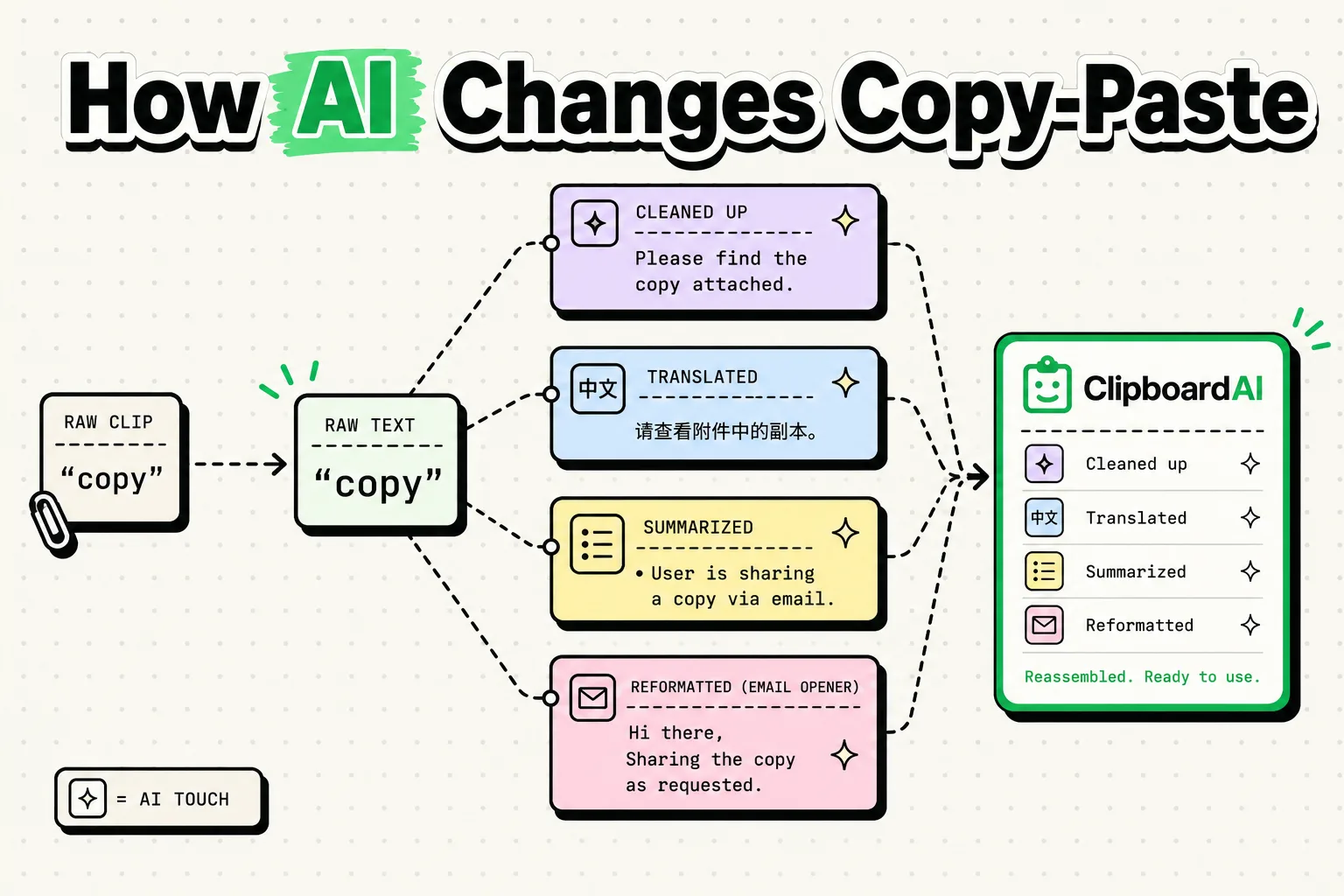
AI solves this by understanding the destination context. Copy rich text but pasting into a plain text field? The AI strips formatting automatically. Copy a phone number in one format but the destination expects another? Reformatted on the fly. Copy a date written as "March 15, 2026" but need "2026-03-15" for a database? Done.
This is not hypothetical. Large language models are already excellent at text transformation tasks. The challenge is making these transformations happen instantly and locally — you do not want a round trip to a cloud server every time you paste something. On-device AI models, like those running on Apple's Neural Engine, can handle these lightweight transformations in real time.
The implications are massive for anyone who works across multiple apps and platforms. Developers copying code between editors, writers moving text between drafts, salespeople transferring contact information between CRM systems — all of these workflows get smoother when the clipboard handles format translation automatically.
Predictive Clipboard: AI That Learns Your Patterns
Every morning you copy your standup update from Notes and paste it into Slack. Every time you fill out a shipping form, you copy the same address. Every week you grab the same meeting link for your recurring call. You are a creature of habit, and AI is very good at spotting habits.
A predictive clipboard learns from your copy-paste patterns over time. It notices that you always copy a certain snippet at 9 AM on weekdays. It sees that after copying a tracking number, you always open the FedEx app within 30 seconds. It recognizes that certain clipboard items get reused over and over while others are one-and-done.
With this data, the AI can pre-surface items you are likely to need. Monday morning? Here is your standup template. Filling out a checkout form? Here is your shipping address. About to join your weekly meeting? Here is the Zoom link. The clipboard becomes proactive rather than reactive.
The privacy implications here are important, which is why on-device processing is essential. Your copy-paste patterns reveal a lot about your habits, work, and personal life. A predictive clipboard that sends all of this data to a cloud server would be a privacy nightmare. The right approach — and the one Apple is pushing with Core ML — keeps all pattern learning on your device, encrypted and private. We explore this distinction deeper in our article on on-device AI versus cloud AI.
Multi-Modal Clipboard: Beyond Text
Text is only part of the clipboard story. AI is enabling clipboards that understand images, screenshots, handwriting, and audio. Copy a screenshot of a restaurant menu and the AI extracts the text. Copy a photo of a whiteboard and it recognizes the handwritten notes. Copy a voice memo and it transcribes the key points.
Apple's Live Text feature already demonstrates this on iOS. You can point your camera at printed text and copy it directly. But AI clipboard managers can take this further by processing visual content after it is copied, making every screenshot searchable and every image's text extractable.
Imagine copying a screenshot of a flight itinerary. An AI clipboard would extract the flight number, departure time, gate number, and booking reference — then categorize each piece of information separately. When you need the flight number later, you search for it just like any text clip. The screenshot becomes structured data.
This multi-modal approach means the clipboard evolves from a text buffer into a genuine knowledge capture tool. Every piece of information you encounter, regardless of format, becomes searchable and retrievable. For more on maximizing your clipboard as a productivity tool, see our guide on combining ChatGPT with a clipboard manager.
Privacy-First AI: Why On-Device Processing Wins
There is a reason we keep emphasizing on-device AI, and it is not just a marketing buzzword. Your clipboard sees everything. Passwords, private messages, financial information, health data, personal addresses — if you have ever copied it, your clipboard has seen it.
Any AI system that processes clipboard data in the cloud is, by definition, sending your most sensitive information to external servers. Even with encryption and privacy policies, the data leaves your device. For a clipboard manager, this is an unacceptable trade-off.
Apple understands this, which is why Apple Intelligence processes most tasks on-device using the Neural Engine. Clipboard AI follows the same philosophy: all categorization, search, and organization happens locally on your iPhone. Your clipboard data never touches a server.
The good news is that on-device AI has gotten remarkably capable. The Neural Engine in modern iPhones can handle natural language processing, pattern recognition, and text classification at speeds that feel instantaneous. You do not sacrifice intelligence for privacy — you get both.
Did You Know?: The A17 Pro chip in iPhone 15 Pro and later can perform 35 trillion operations per second on its Neural Engine. That is more than enough horsepower to run sophisticated AI models for clipboard management without ever connecting to the internet.
What Comes Next: The Clipboard in 2027 and Beyond
If the current trajectory holds, here is what your clipboard will look like by 2027. It will automatically categorize everything you copy. It will suggest the right clip based on context. It will transform formats on the fly. It will learn your patterns and pre-surface what you need. It will understand images and audio, not just text. And it will do all of this privately, on your device.
The clipboard will evolve from a temporary buffer into a persistent, intelligent layer between you and every app on your phone. It will be less like a sticky note and more like a personal assistant that remembers everything you have ever seen, read, or shared — and knows exactly when to remind you of it.
For now, the best way to experience the leading edge of this evolution is with an AI-powered clipboard manager. Clipboard AI already delivers auto-categorization, smart search, and cross-device sync. As AI capabilities expand, these foundations become even more powerful. For a deeper look at what is on the horizon, read our piece on smart clipboards and what is coming in 2027.
The humble copy-paste shortcut has been the most used computing feature for half a century. AI is not replacing it. AI is giving it the upgrade it has deserved for decades. The future of your clipboard is intelligent, private, and already arriving on your iPhone.
Frequently Asked Questions
How is AI changing copy-paste?
AI is adding intelligence to clipboard operations by automatically categorizing copied content, suggesting relevant paste targets, transforming text formats on the fly, and learning your patterns to surface the right clipboard item at the right time.
What is a smart clipboard?
A smart clipboard is a clipboard manager that uses AI and machine learning to go beyond simple text storage. It can categorize content, detect patterns like phone numbers and addresses, suggest relevant clips based on context, and even reformat content for different destinations.
Can AI clipboard managers read my private data?
Privacy-focused AI clipboard managers like Clipboard AI process everything on-device. Your copied text never leaves your iPhone. The AI runs locally using Apple's Core ML framework, so no data is sent to external servers.
Will AI replace manual copy-paste?
AI won't eliminate copy-paste but will make it dramatically smarter. Instead of manually finding and pasting text, AI will predict what you need, suggest clipboard items in context, and even auto-fill information before you reach for it.
What AI features does Clipboard AI have?
Clipboard AI uses on-device intelligence to auto-categorize copied content into types like links, codes, addresses, and phone numbers. It also provides smart search, duplicate detection, and contextual suggestions based on your clipboard history.
App CTA Share Tags Author