
The Short Version
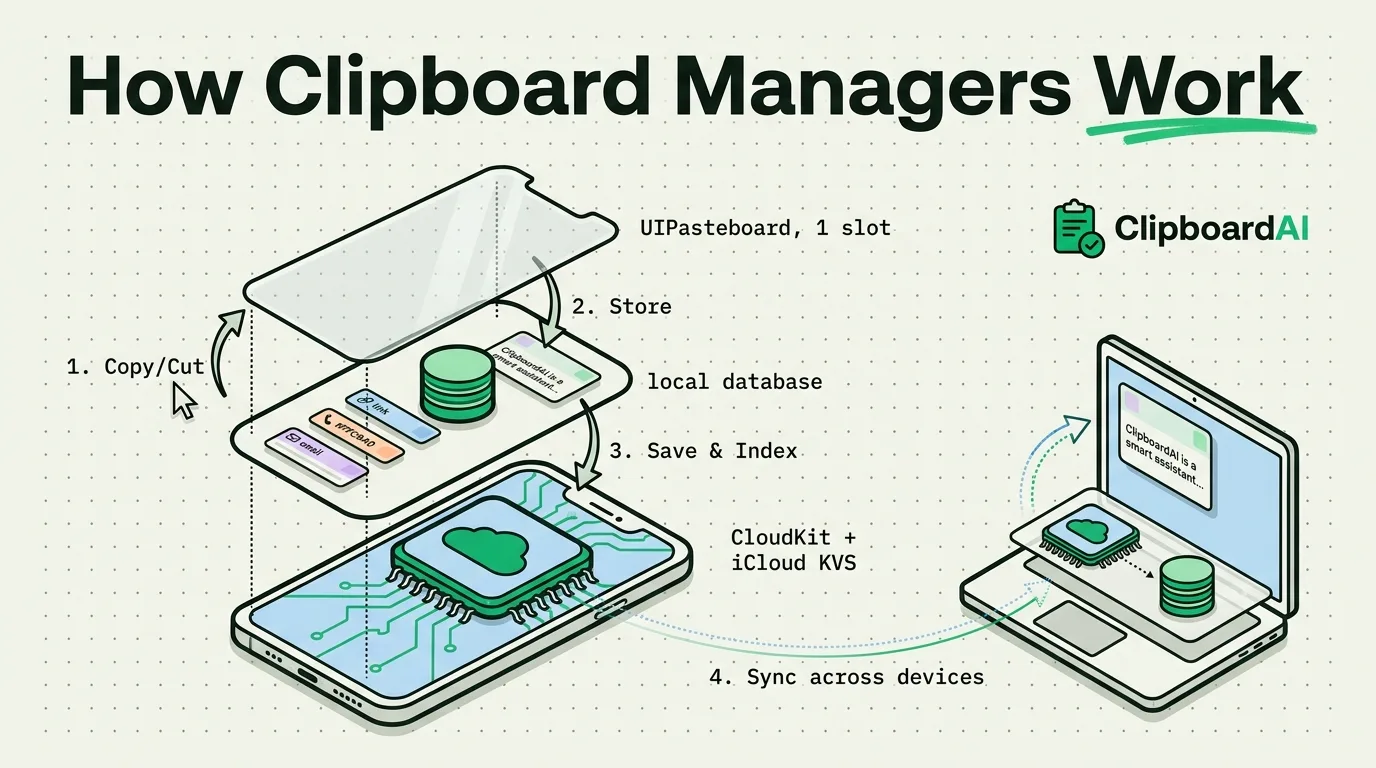
A clipboard manager works by watching the operating system's clipboard for changes, copying each new item into its own database before the system overwrites it, then giving you a searchable list to paste back from. On iPhone that watching happens through a custom keyboard extension you grant "Full Access" to; on Mac it happens through a background app that polls or listens for clipboard changes. Nothing here is exotic, but the details of how it is done, and done without draining your battery or leaking your data, are where clipboard managers actually differ.
Step 1: The Problem It Is Solving
Both iOS and macOS ship with a single-item clipboard (Apple calls it the pasteboard, technically UIPasteboard on iOS and NSPasteboard on Mac). Copy one thing, and it sits in that one slot. Copy something else, and the first item is gone with no way to recover it. Apple has never added a native history view to either OS. Every clipboard manager, including ClipboardAI, exists to sit on top of that one-slot system and keep what it would otherwise discard.
Step 2: How It Detects a New Copy
On Mac, a clipboard manager runs as a background process and checks the system pasteboard's change count, a number the OS increments every time the clipboard content changes. When the count changes, the app reads the new content and stores it. This is why some Mac clipboard tools felt sluggish on rapid copies in the past: checking too slowly means missing a copy that gets overwritten before the next check.
On iPhone, there is no equivalent background access for third-party apps outside of a keyboard extension. That is why iOS clipboard managers work through a custom keyboard: once you enable "Allow Full Access" for the keyboard in Settings, it can read the pasteboard while it is active and add items to its own history.
Step 3: Where the History Actually Lives
Saved clips are stored in a local database on the device, not floating in system memory. That is what makes history persistent across app switches and reboots, unlike the native single-item clipboard, which iOS/macOS can clear under memory pressure. Categorization (recognizing a link, phone number, email address, or block of code) happens on-device by pattern-matching the text, not by sending it to a server.
Step 4: How Cross-Device Sync Works
Getting a clip from iPhone to Mac (or back) requires moving it off the device entirely. ClipboardAI does this through Apple's CloudKit and iCloud Key-Value Store, plus a separate local-network transport for when both devices are on the same Wi-Fi. That traffic moves through your own private iCloud account using Apple's CloudKit, the same infrastructure that protects your Photos and Notes, encrypted in transit and at rest. Your clips never pass through or land on a ClipboardAI server, there is no account to create, and there is nothing for us to see. And if you would rather keep everything in one place, you can leave sync off entirely and nothing ever leaves your iPhone.
Native Pasteboard vs. Clipboard Manager
| Native iOS/macOS pasteboard | Clipboard manager (e.g. ClipboardAI) | |
|---|---|---|
| History | 1 item, overwritten instantly | Full running history, searchable |
| Survives app switch/reboot | Often cleared | Persisted to local database |
| Categorization | None | Automatic (links, numbers, emails, etc.) |
| Cross-device | Apple's own Handoff/Universal Clipboard, manual, 1 item | Ongoing sync via iCloud (CloudKit + KVS) and local network |
| Sensitive-app handling | None built in | Mac only: auto-skips password managers via nspasteboard.org markers, plus a manual Excluded Apps list |
Frequently Asked Questions
Do clipboard managers see everything I copy, even passwords?
By default, most keep everything unless you configure exclusions. On Mac, ClipboardAI automatically recognizes the "transient/concealed" markers that password managers like 1Password and KeePassXC already attach to sensitive copies, and skips saving those, plus you can add specific apps to an Excluded Apps list. There is no equivalent automatic exclusion on iPhone/iPad.
How is my synced clipboard kept private?
Sync runs entirely through your own iCloud account (CloudKit, iCloud Key-Value Store, and a direct device-to-device transport when both devices share Wi-Fi), encrypted in transit and at rest by Apple, the same protection as your Photos and Notes. No clip is ever copied to a ClipboardAI server, there is no separate account to sign into, and you can turn sync off at any time to keep every clip on-device.
Why does an iPhone clipboard manager need "Full Access"?
iOS only lets a custom keyboard read the system pasteboard while that keyboard is the active input method, and only if you have granted it Full Access in Settings. Without Full Access, a keyboard extension cannot see or save what you copy.