
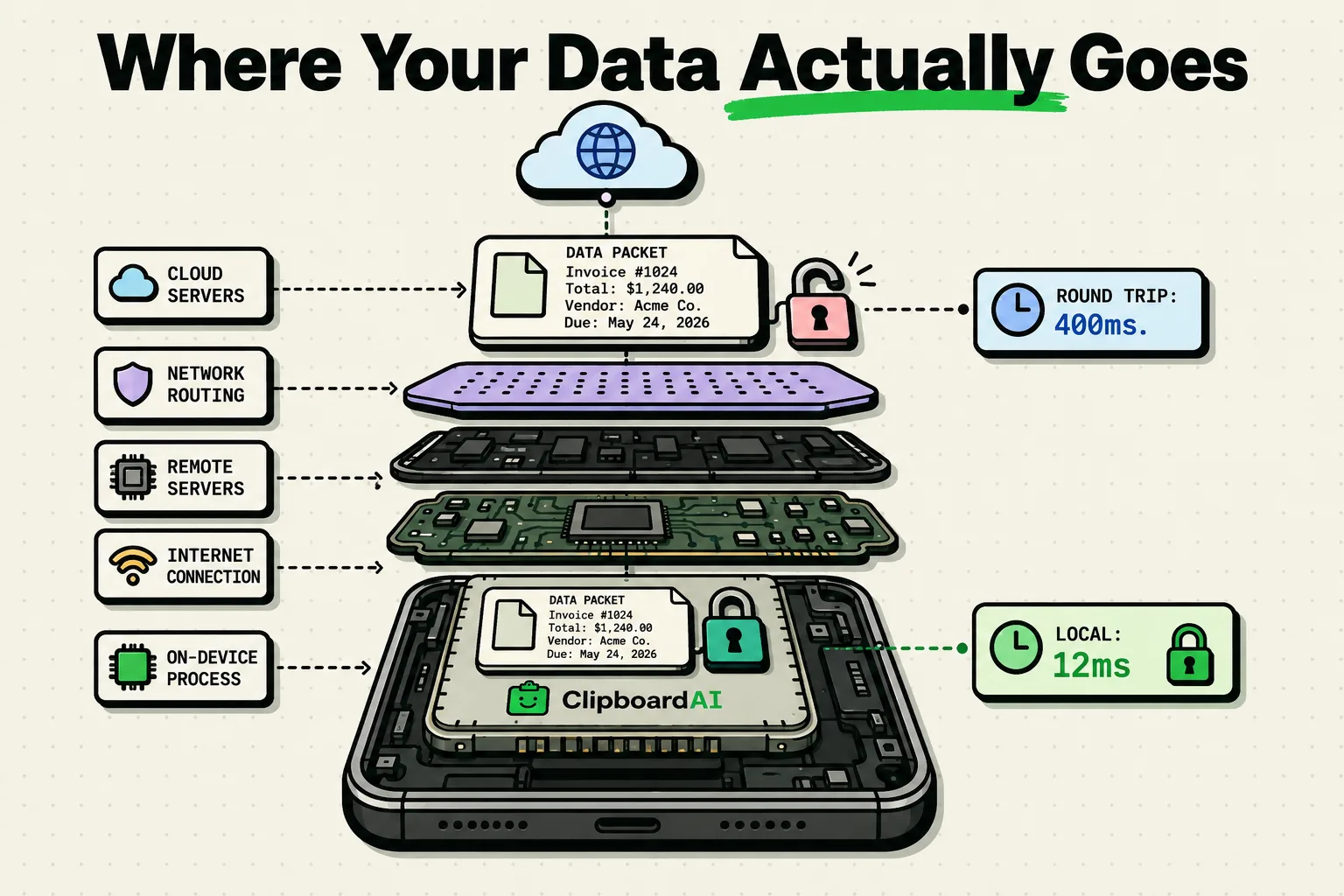
To evaluate AI application security, you must understand the distinction between on-device AI - which processes sensitive text and files locally using processors like Apple's Neural Engine - and cloud-based AI, which transmits your decryptable data to external servers. For clipboard management, local processing is essential. Running AI models on-device ensures that passwords, addresses, and private chats never leave your iPhone, mitigating risks of man-in-the-middle interception, data breaches, and server-side profiling.
While local processing prevents data transit over the internet, it does not secure your files if your phone's physical operating system is compromised. A jailbroken device or a device infected with kernel-level malware can bypass sandbox protections to read local databases. Always run the latest security patches on your OS.
The AI Processing Divide
Artificial intelligence models are demanding. They require billions of mathematical calculations to parse language, categorize objects, or predict actions.
Historically, mobile devices lacked the processors to handle these computations. Developers had no choice but to build cloud-based structures: the phone acted as a simple terminal, sending raw data to remote servers where heavy graphics processing units (GPUs) handled the work.
With modern mobile silicon, this architecture is no longer necessary. The integration of dedicated machine learning hardware - like Apple’s Neural Engine - allows smartphones to run complex models locally.
This technological shift creates a stark divide between local-first and cloud-dependent applications.
Technical Architecture Comparison
Understanding the path your data travels is critical to securing your digital footprint. The table below details how on-device and cloud systems handle variables in daily use:
| Metric | On-Device AI Architecture (ClipboardAI) | Cloud-Based AI Architecture (Legacy Apps) |
|---|---|---|
| Data Transit Path | Stays entirely within device RAM and local flash storage. | Transmitted over TLS/HTTPS to remote web servers. |
| Server-Side Storage | None. No database records or profiles are created. | Data is stored in databases for logging, training, or profiling. |
| Latency / Execution | Sub-10ms; limited only by local system clock. | 100ms - 2000ms; dependent on network connection. |
| Offline Availability | Works 100% offline (e.g. in airplane mode). | Completely fails without an active internet connection. |
| Data Breach Risk | Zero server breach exposure; isolated to physical device. | High; subject to server compromises, leaks, and APIs. |
| Hardware Core | Apple Neural Engine (ANE) via Core ML. | Remote server clusters (NVIDIA / AMD GPUs). |
5 Security Audits for Your AI Mobile Applications
Use this checklist to identify if your productivity applications are exposing your data:
- Test App Behavior Offline: Turn on Airplane Mode (with Wi-Fi and Bluetooth disabled) and attempt to run the app’s search or categorization features. If they fail, the app relies on cloud relays.
- Inspect Cell Data Usage: Go to Settings > Cellular and scroll down to the app's name. If a text editor or utility is consuming hundreds of megabytes of cellular data, it is streaming files to external targets.
- Check App Store Privacy Labels: Open the App Store page, scroll to App Privacy, and verify if the app maps "Data Linked to You" or "Data Used to Track You" (like Search History or Diagnostics).
- Disable Unencrypted Cloud Backups: If an app saves data locally but backs up to unencrypted cloud databases, your local security is bypassed. Use end-to-end encrypted backup services.
- Review Third-Party API Policies: If an app integrates cloud APIs (like OpenAI or Anthropic), check if their developer policy excludes your inputs from model training queues.
How local processing works in memory
When you copy text on your iPhone, the string is moved into the clipboard buffer. In a cloud-dependent system, the app triggers an API call, packaging the string and sending it over the network.
In ClipboardAI, the local daemon intercepts the copy event and passes the string directly to the Core ML runtime.
  [Copied Text: Raw Input] ──(Memory Bus)──> [Core ML Local Model]
                                                     │
                                            (Local Classification)
                                                     │
                                                     ▼
  [Local SQLite Database] <──(Encrypted Save)── [Entity Classification]
The classifier determines if the input is a URL, address, or phone number in memory. The result is written directly to an encrypted SQLite database on your device. The internet connection is never accessed.
Performance Constraints of On-Device Silicons
While on-device execution provides unmatched security, developers must navigate hardware limitations:
- Model Size Constraints: Large language models (LLMs) like GPT-4 require hundreds of gigabytes of RAM. Mobile devices have limited unified memory (typically 6GB to 16GB). Consequently, local models must be highly optimized and compressed (quantized), which can reduce their linguistic complexity.
- Thermal Throttling: Running heavy machine learning tasks continuously causes the system chip to generate heat. To prevent hardware damage, the OS will throttle the processor speed, which can cause temporary interface lag.
- Storage Footprint: Shipping local models means the app download size is larger. While a cloud app might be 20MB, a local AI app containing specialized neural networks can exceed 150MB.
Frequently Asked Questions
How is my synced clipboard kept private?
When ClipboardAI syncs your history across your Apple devices, it moves through your own private iCloud account using Apple's CloudKit and iCloud Key-Value Store, plus a direct device-to-device local-network transport when both devices share Wi-Fi. It is encrypted in transit and at rest by Apple, the same protection tier as your iCloud Photos and Notes. No clip content is ever transmitted to or stored on a ClipboardAI server, there is no ClipboardAI account, and you can turn sync off entirely for a fully local, on-device-only setup.
What is the Apple Neural Engine (ANE)?
The Neural Engine is a specialized accelerator hardware block integrated into Apple's A-series and M-series chips. It is designed to perform matrix multiplication operations at high speeds and with very low energy consumption.
Does on-device AI drain my battery faster than cloud AI?
No. Because transmitting data over cellular radios (5G/LTE) is highly power-intensive, making constant cloud requests drains your battery faster than running local, optimized models on the energy-efficient Neural Engine.
Can I exclude certain apps from being categorized by local AI?
Yes. Inside the ClipboardAI settings menu, you can configure app blocklists. If you copy text while inside a banking app, the local classifier is bypassed entirely, and no entry is written to your history database.