
The nine text tools fix the shape of a clip. Sometimes the words themselves need work: a rambling paragraph that should be three bullets, a message that came out sharper than you meant, an email thread you only need the gist of. The Apple Intelligence section of Transform rewrites the clip for you, on your device.
Open a text clip, tap Transform, and pick one of the six Apple Intelligence rewrites. Part of Clipboard AI Pro, on iPhones, iPads, and Macs that support Apple Intelligence.
Rewrite a clip on iPhone
- Open a text clip and tap Transform, or tap Transform Text on the clip's detail screen.
- Under Apple Intelligence, tap the rewrite you want. The new version streams into the Result box as it is written.
- Tap Copy Transformed Text to put it on your clipboard. The original clip is left exactly as it was.
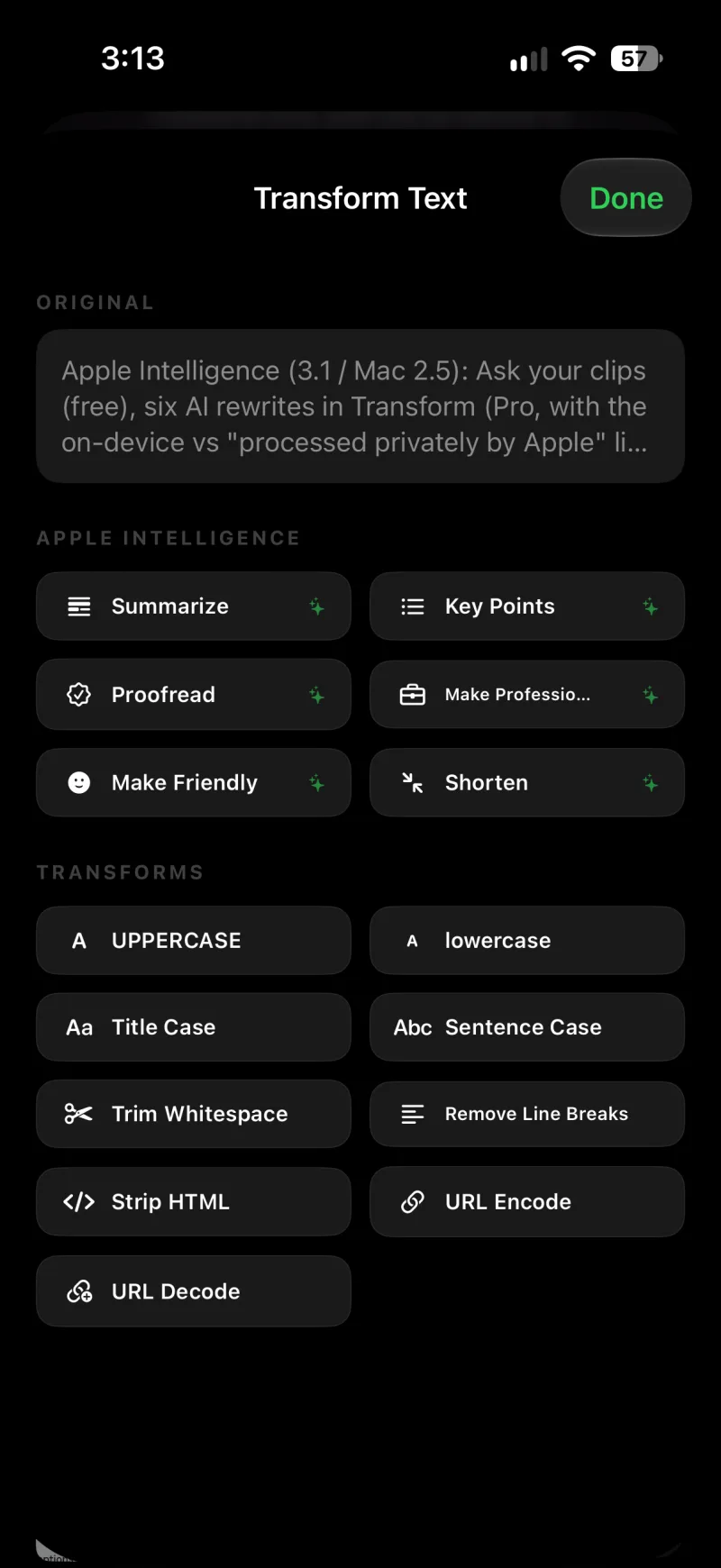
The six rewrites
- Summarize condenses the text to a few sentences.
- Key Points turns it into a bulleted list.
- Proofread fixes spelling, grammar, and punctuation, and leaves everything else alone.
- Make Professional rewrites it in a professional tone.
- Make Friendly rewrites it in a warm, casual tone.
- Shorten cuts it to about half the length.
The result of a rewrite is just text in the Result box, so you can follow it with any of the nine tools, like Sentence Case after Proofread, before you copy.
On Mac
In All Clips, click Transform on any text clip. The Apple Intelligence row sits at the top of the Transform panel with the same six rewrites; click one and the result streams into the preview, ready to copy or paste like any other transform. See Clean up text on Mac.
Where it runs
Every result ends with a line that says where it was made:
- "100% on this device, using Apple Intelligence." The on-device model wrote it. On iOS 26 and macOS 26 this is always the case.
- "Processed privately by Apple. Never stored." On iOS 27 and macOS 27, longer text can be handed to Apple's Private Cloud Compute, which is better at long clips and at languages the on-device model does not cover. Apple processes it privately and keeps none of it.
- "Done on this device." followed by the reason: the request started towards the cloud but your device finished it, because the day's allowance is used up or there was no internet connection.
Apple's private cloud has a daily allowance. When it is nearly or fully used up, a quiet line in the Apple Intelligence section says so, and rewrites run on your device instead until it resets. If the cloud is ever unavailable, the on-device model steps in on its own.
iOS 26 or macOS 26 or later, on a device that supports Apple Intelligence (iPhone 15 Pro or newer, an iPad with Apple silicon or the A17 Pro chip, or a Mac with Apple silicon), with Apple Intelligence turned on in Settings. On any other device the section does not appear and the nine text tools work exactly as before. The rewrites are part of Clipboard AI Pro; on the free plan the section shows a Pro badge.
TL;DR: summaries without asking
Clearly long clips, like a pasted article or an email thread, get a short TL;DR line under them the moment they are captured, so you can tell what a clip is without opening it. Medium-length clips offer a TL;DR button on the detail screen instead, and Update Summary rewrites the line any time. The same models write these, with the same footnote about where they ran; on devices without Apple Intelligence, the line is built from the clip's own first sentences instead, so a long clip always has one. TL;DR is free.
The nine text tools never leave your device. The rewrites and TL;DR run on your device or, on iOS 27 and macOS 27, through Apple's private cloud, which never stores what it processes. Nothing about a rewrite is sent to Clipboard AI, and your clip library is never uploaded to be read.
If a rewrite is not working
- The Apple Intelligence section is missing. The device does not support Apple Intelligence, or it is on an older version of iOS or macOS.
- "Turn on Apple Intelligence in Settings to use these transforms." Open the Settings app, go to Apple Intelligence & Siri, and turn it on.
- "Apple Intelligence is still getting ready on this device." The model is still downloading. Give it a little while.
- "Apple Intelligence is taking a short breather." Too many rewrites in a row. Wait a moment.
- "Apple Intelligence doesn't support this language yet." The on-device model covers a limited set of languages. On iOS 27, long text in other languages can go to the private cloud instead.
- "Apple Intelligence couldn't rewrite this one." The model declined the text. Try a shorter piece, or a different rewrite.